Skip to content
AnkerGames - Home
Lossless Scaling

Lossless Scaling

Rate & review
5.0/5·8 reviews
Log in to rate 100% recommend Read reviews
PC317.4 MB2018
V 3.2.2

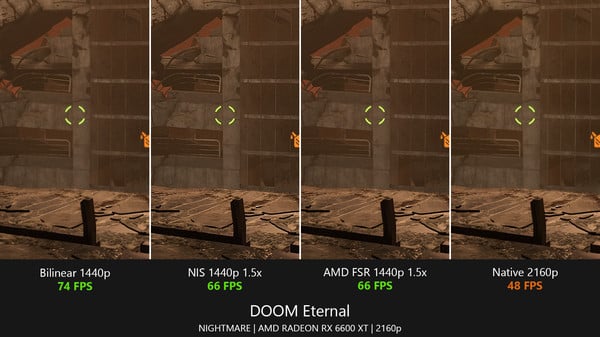
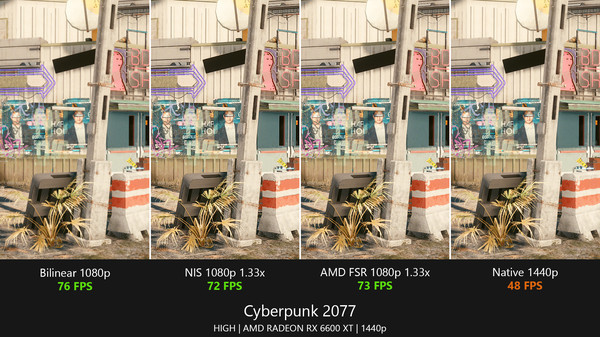
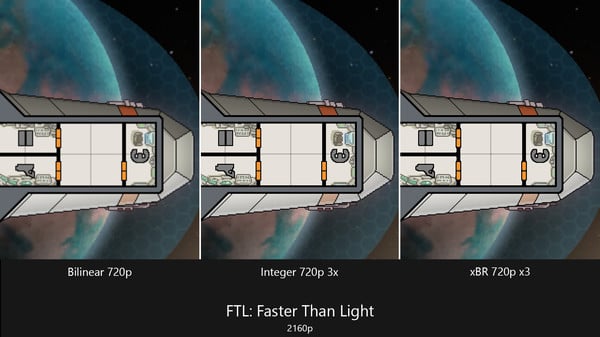
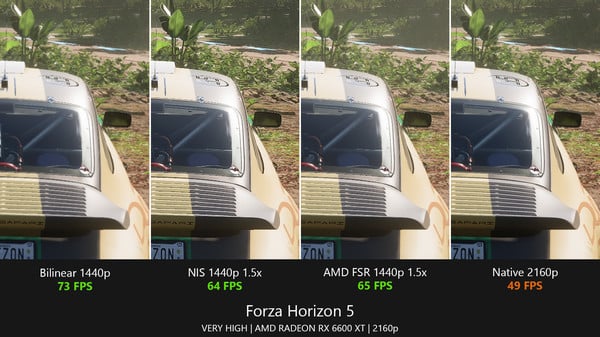
Lossless Scaling is also useful for upscaling modern games if you cannot run them at native screen resolution (GPU limited) and want to get rid of blur due to bilinear scaling of the GPU driver, as well as for upscaling older and pixel-art games which do not support modern screen resolutions or full screen mode.

Lossless Scaling Free Download - Game Review

This is NOT a magic solution like people make it out to be simply because the extra added frame of input lag (or several if you're using a multiplier higher than 2x) can be a dealbreaker for many people, it works better as a band-aid solution. there's GPU overhead so performance will end up being worse if your GPU is already running at full load or you have a bad PC. cap your game's framerate to half of your target framerate (if you want 120fps, cap the game to 60). stick to 2x multiplier if you can as the artifacting and input lag get worse as this multiplier increases. Crosshair X 

Game Screenshots Gallery

Lossless Scaling screenshot 1
Lossless Scaling - Screenshot 1

Lossless Scaling screenshot 2
Lossless Scaling - Screenshot 2
Lossless Scaling screenshot 3
Lossless Scaling - Screenshot 3
Lossless Scaling screenshot 4
Lossless Scaling - Screenshot 4

Installation Guide

Step-by-step setup process

1
Game is pre-installed / portable, therefore you do not need to install the game.
2
Just extract the rar / zip file.
3
Simply launch the game from LosslessScaling.exe inside the Lossless Scaling folder.

Important Notes

Please review these important details before installation

Install necessary apps from Redist or _CommonRedist to ensure game launches without any problems.

Always extract game in Antivirus / Defender excluded folder - Please check our FAQs to know why it is important.

Always run the game as administrator

For detailed guide, make sure to read Installation Guide.txt inside the game files.

System Requirements

Minimum specifications needed

Requires a 64-bit processor and operating system

OS
Windows 11 x64
Graphics
GeForce GTX 1060 / Radeon RX 580
DirectX
Version 11

Recommended For You

Aseprite
Aseprite
V 1.3.18

Indie

Aseprite

20160.01 GB

Aseprite
SULFUR
SULFUR
V 0.19.10

Early Access

Action

SULFUR

20240.95 GB

SULFUR
One More Night
One More Night
V 1.0

Action

One More Night

202414.40 GB

One More Night
Japanese Ramen Simulator
V 0.1.58.18606

Early Access

Simulation

Japanese Ramen Simulator

20263.77 GB

Japanese Ramen Simulator

Community voices

Player perspectives

Spot the sentiment at a glance, then dive into the stories that matter to you.

Sort by

Average

/5
5.0

recommend

100%

written

2

verified

2

Sentiment mix8 reviews
100% Positive
0% Neutral
0% Critical

Quick filters

Rating spread

5★
8
4★
0
3★
0
2★
0
1★
0

Fresh off the press

2 weeks ago 5.0/5

Look for it at the top of the stream.

BLANK :}
BLANK :} 8 months agoEdited New Challenger 5 5.0/5

Whoever made this deserves heaven

Landon
Landon 1 year agoEdited Verified New Challenger 28 5.0/5

Great Software

Sign in to join the discussion

Discussion

Comments 15

BestNewestOldestReplies
Minh

Minh

· edited

can I use this on Win 10 ?


00Reply
1reply
lilah1850

lilah1850

Thank youu for this

00Reply
jaljalani620

jaljalani620

· edited

why is the app not launching?

00Reply
1reply
Zoro

Zoro

Admin
Launch the game from Lossless Scaling / LosslessScaling.exeIf Not Find Then Off Windows Defender and re-Download
11Reply
peter

peter

where can i find losless scaling there is no exe file
00Reply
1reply
Zoro

Zoro

Admin
Run losslessscaling.exe as Administrator, disable antivirus, try compatibility mode, update Windows & drivers
01Reply
peter

peter

it does not open when i click on the app "loselessscaling.exe".
00Reply
1reply
peter

peter

i am clicking the app "loselessscaling.exe" its not opening.
00Reply
Zoro

Zoro

Admin
Apply registry fix provided inside the app folder
00Reply
peter

peter

It just tells me to "make sure you have lossless scaling installed through steam"
00Reply
1reply
Zoro

Zoro

Admin
Its Up to Date Already.
00Reply
Zoro

Zoro

Admin
Already Available In Latest Version.
00Reply
peter

peter

update pls
00Reply
2replies
Zoro

Zoro

Admin
Select the game in Lossless Scaling, click "Start Scaling," and adjust settings as needed for optimal quality.
00Reply
peter

peter

How do you implement this tho. Just let it run along the game??
00Reply
1reply