
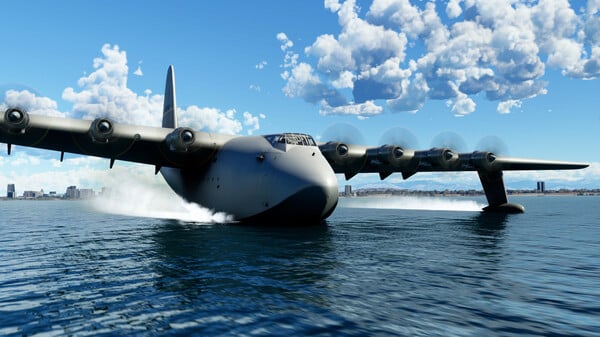
Microsoft Flight Simulator - Screenshot 1



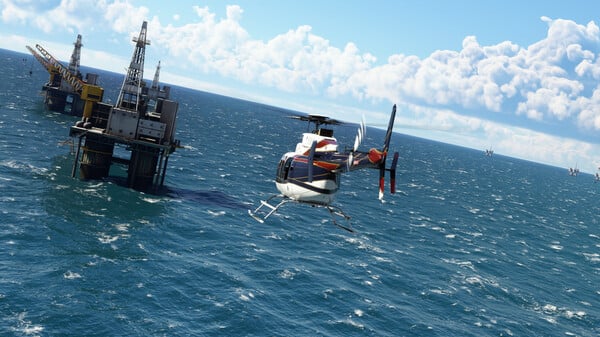
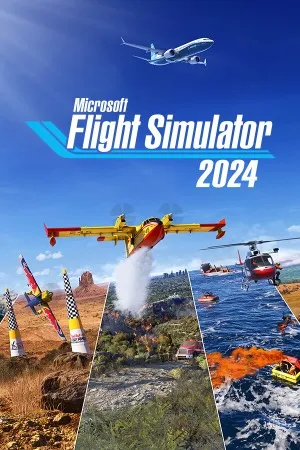
Launch your aviation Career wherever you choose in the world. Gain experience, build your reputation, and complete certifications to gain access to authentic aviation activities ranging from Medevac, Remote Cargo Ops, Aerial Firefighting, Search & Rescue and more, all the way to becoming an Airline Passenger Transport Pilot. Set out on a truly global aviation adventure with virtually unlimited missions across the planet.
Compete against other pilots in the all-new Challenge League mode or hone your skills in dozens of Activities ranging from exciting Rally Races and Precision Landings to Low-Altitude challenges and more. Fly head-to-head in the iconic Red Bull Air Races and the legendary Reno Air Races, including the new Roswell courses. Be a World Photographer and travel across our beautiful planet to capture awe-inspiring natural vistas, visit famous landmarks, and record these adventures with pictures in your travel book. Unique photo challenges test your creative eye along with your piloting skills while you strive to capture the perfect moment. Microsoft Flight Simulator 2024
Step-by-step setup process
Please review these important details before installation
Install necessary apps from Redist or _CommonRedist to ensure game launches without any problems.
Always extract game in Antivirus / Defender excluded folder - Please check our FAQs to know why it is important.
Always run the game as administrator.
For detailed guide, make sure to read Installation Guide.txt inside the game files.
Minimum specifications needed
This build ships with the online fix, so multiplayer and co-op work over the internet with friends running the same version — no extra patch to download. Everyone joins through the game's own lobby or invite system; keep the build identical on all machines when a new version is released. All games with an online fix

Action
202666.90 GB
Simulation
20249.50 GB

Action
201934.00 GB

Simulation
202110.40 GB
Community voices
Spot the sentiment at a glance, then dive into the stories that matter to you.
Average
/5recommend
100%
written
1
verified
0
Quick filters
Rating spread
Fresh off the press
Look for it at the top of the stream.
..



Leaving AnkerGames
Your about to visit the following urlInvalid URL
Sign in to join the discussion · comment, reply and react
Discussion
Comments 42
Pinned by moderators
Carzed
Mod · editedPREREQUISITES
You need to have XBOX App installed on your pc, install it from here -> https://apps.microsoft.com/detail/9mv0b5hzvk9z?hl=en-US
PREREQUISITES
You need to have XBOX App installed on your pc, install it from here -> https://apps.microsoft.com/detail/9mv0b5hzvk9z?hl=en-US
You need to have XBOX Gaming services installed -> https://0807.st/p/EP9FmDQ.appxbundle<-- install it from here
then it will prompt you to get xbox services ,just click get there
Also install the directX UWP installer--> https://0807.st/p/zkGDipL.appx <--- install it from here
PEDRO CEARENSE
· editedWarning: CustomInstallActions will be ignored for a loose registered package.
erro 0x80070005: ao processar a solicitaþÒo, o sistema nÒo p¶de registrar a extensÒo windows.firewall devido ao seguinte erro: Acesso negado.
.
Copied temporary generated AppXManifest.xml file to C:\Users\******\AppData\Local\Temp\Microsoft.FlightSimulator_1.39.12.0_x64__8wekyb3d8bbwe_AppXManifest.xml
temp: <?xml version="1.0" encoding="UTF-8"?>
<Package xmlns:uap="http://schemas.microsoft.com/appx/manifest/uap/windows10" xmlns:desktop6="http://schemas.microsoft.com/appx/manifest/desktop/windows10/6" xmlns:desktop="http://schemas.microsoft.com/appx/manifest/desktop/windows10" xmlns:uap3="http://schemas.microsoft.com/appx/manifest/uap/windows10/3" xmlns:wincap="http://schemas.microsoft.com/appx/manifest/foundation/windows10/windowscapabilities" xmlns:rescap="http://schemas.microsoft.com/appx/manifest/foundation/windows10/restrictedcapabilities" IgnorableNamespaces="uap uap3 desktop desktop6 wincap rescap" xmlns="http://schemas.microsoft.com/appx/manifest/foundation/windows10">
<Identity Name="Microsoft.FlightSimulator" Publisher="CN=Microsoft Corporation, O=Microsoft Corporation, L=Redmond, S=Washington, C=US" Version="1.39.12.0" ProcessorArchitecture="x64" />
<Properties>
<DisplayName>Microsoft Flight Simulator</DisplayName>
<PublisherDisplayName>Microsoft Studios</PublisherDisplayName>
<Logo>StoreLogo.png</Logo>
<Description>Microsoft Flight Simulator</Description>
<desktop6:RegistryWriteVirtualization>disabled</desktop6:RegistryWriteVirtualization>
<desktop6:FileSystemWriteVirtualization>disabled</desktop6:FileSystemWriteVirtualization>
</Properties>
<Dependencies>
<TargetDeviceFamily Name="Windows.Desktop" MinVersion="10.0.18362.0" MaxVersionTested="10.0.18362.0" />
<PackageDependency Name="Microsoft.DirectXRuntime" MinVersion="9.29.1974.0" Publisher="CN=Microsoft Corporation, O=Microsoft Corporation, L=Redmond, S=Washington, C=US" />
<PackageDependency Name="Microsoft.VCLibs.140.00.UWPDesktop" MinVersion="14.0.33519.0" Publisher="CN=Microsoft Corporation, O=Microsoft Corporation, L=Redmond, S=Washington, C=US" />
</Dependencies>
<Resources>
<Resource Language="en-US" />
<Resource Language="fr-FR" />
<Resource Language="de-DE" />
<Resource Language="es-ES" />
<Resource Language="es-MX" />
<Resource Language="it-IT" />
<Resource Language="pl-PL" />
<Resource Language="pt-PT" />
<Resource Language="pt-BR" />
<Resource Language="ru-RU" />
<Resource Language="nl-NL" />
<Resource Language="ja-JP" />
<Resource Language="nb-NO" />
<Resource Language="fi-FI" />
<Resource Language="sv-SE" />
<Resource Language="zh-CN" />
<Resource Language="ko-KR" />
<Resource Language="tr-TR" />
</Resources>
<Applications>
<Application Id="App" Executable="FlightSimulator.exe" EntryPoint="Windows.FullTrustApplication">
<uap:VisualElements DisplayName="ms-resource:AppName" Square150x150Logo="Logo.png" Square44x44Logo="SmallLogo.png" Description="Microsoft Flight Simulator" ForegroundText="light" BackgroundColor="#000040">
<uap:SplashScreen Image="SplashScreen.png" />
</uap:VisualElements>
<Extensions>
<uap:Extension Category="windows.protocol">
<uap:Protocol Name="ms-xbl-69f80140" />
</uap:Extension>
<uap:Extension Category="windows.protocol">
<uap:Protocol Name="ms-xbl-multiplayer" />
</uap:Extension>
<uap3:Extension Category="windows.appExecutionAlias" EntryPoint="Windows.FullTrustApplication">
<uap3:AppExecutionAlias>
<desktop:ExecutionAlias Alias="FlightSimulator.exe" />
</uap3:AppExecutionAlias>
</uap3:Extension>
</Extensions>
</Application>
</Applications>
<Capabilities>
<Capability Name="internetClient" />
<rescap:Capability Name="runFullTrust" />
<rescap:Capability Name="unvirtualizedResources" />
</Capabilities>
</Package>
MicrosoftGame.Config registration failed.
Failed with 0x80070005.
hELP PLEASE
Antrol
· editedI've downloaded and uncompressed the 1.48GB zip, TWICE now, followed the readme, installed prerequisites and made sure none of the files went to protection history and yet, I get the following error:
Failed to load xgameruntime.dll
Error code: 126
mathias morales
· edited"failed to load onlinefix64.dll" — I need help with that.
Rodrigo Machado
· editedGame is working perfecly. The only thing is I need the tecnam p2002 jf to train and the game doesn't have it by default. Anyone know how I can get it?
r5_en
· editedthis game is perfect , hope they can crack the 24 too
claverkiller
· editedgood
danWANTSAFUCKINGACC
· editedcould i use this with bottles (the linux app)?
Hammoud
· editedwhy there is error . it said , failed to load ixameruntime.dll Error code: 126
moaazmughal1441064
· editedneed guidance.
[email protected]
· editedplease update to 1.39
biome_1
· editedi can find the _CommonRedist or the _Redist folder anywhere
Vivaan Patil
· editeddoes it have all planes and stuff?
.dirtyjoedirt
· editedwheres the 1.39 update?
BlueDye
· editedwhy is the file only 1.4gb when i download it?